

401 k Enrollment Form: A Step-by-Step Walkthrough for Your Employer’s Plan
How to complete your 401(k) enrollment form
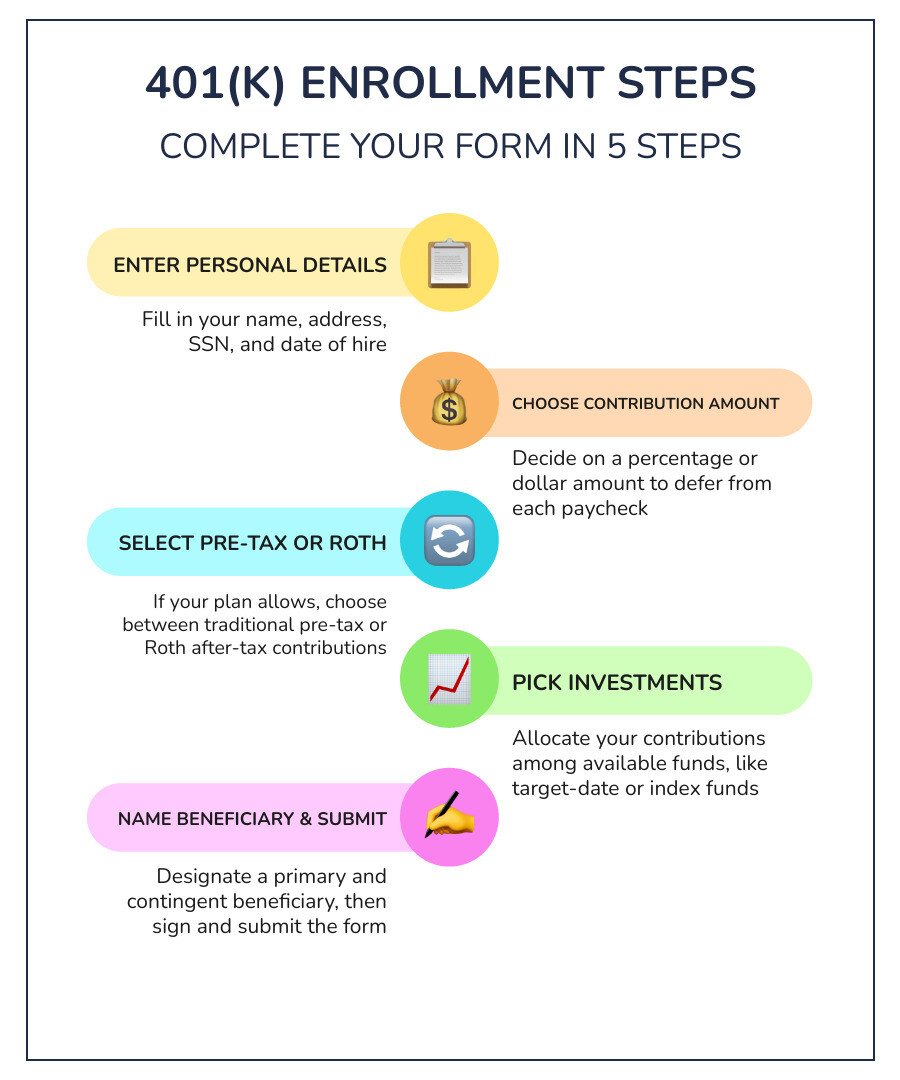
To complete your 401(k) enrollment form, enter your personal details, choose a contribution amount, select pre-tax or Roth contributions if your plan allows them, and make an investment election. Name a beneficiary, review any automatic contribution increase option, then sign and submit the form as your plan directs. Check your first pay stub to confirm the deduction.
Your plan administrator handles enrollment, but your choices can shape how money leaves your paycheck and enters your account. The 401(k) Maneuver team, an independent fiduciary, walks through the typical form so you can make those choices with more confidence.
Some Key sections of a standard 401(k) enrollment form

Workplace retirement paperwork can seem daunting at first glance, but every standard document breaks down into predictable components. When you understand the basic structure of a 401(k), the paperwork becomes much easier to navigate.
The first section establishes your identity and employment records. You will provide your legal name, residential address, Social Security number, date of birth, and date of hire. You must also record your marital status, which plays an important legal role in designating beneficiaries.
To clarify specific definitions or operational rules, consult your plan’s Summary Plan Description (SPD). The SPD explains the exact features, eligibility requirements, and deadlines established by your employer’s plan document.
Required fields on the 401(k) enrollment form
When completing your form, confirm that each required field is filled out accurately:
- Personal Identification: Full legal name, date of birth, and Social Security number.
- Contact Details: Current mailing address, phone number, and preferred email.
- Employment and Payroll Data: Employer name, department, employee ID, and payroll frequency (e.g., biweekly, semimonthly).
- Participation Election or Opt-Out Waiver: An affirmative election to contribute, or a signed waiver if you choose not to participate at this time.
- Signature and Date: A physical, handwritten signature or verified electronic signature, depending on whether your employer uses paper forms or an online portal.
Automatic features and 401(k) auto-enrollment provisions
Many employers now use automatic enrollment designs to help employees save. If you do not submit an enrollment form, the plan may automatically deduct a default percentage from your wages and place it into a default investment fund.
Plans may also include automatic escalation features. Auto-escalation increases your contribution rate by 1%, 2%, or 3% each year until you reach a set cap.
Reviewing how automatic enrollment works can help you decide whether to keep the default settings or customize your own deferral rate. If you wish to decline participation or select a different savings percentage, you must submit your form or log into your benefits portal before the plan’s administrative opt-out deadline.
Step-by-step: How to complete your 401(k) enrollment

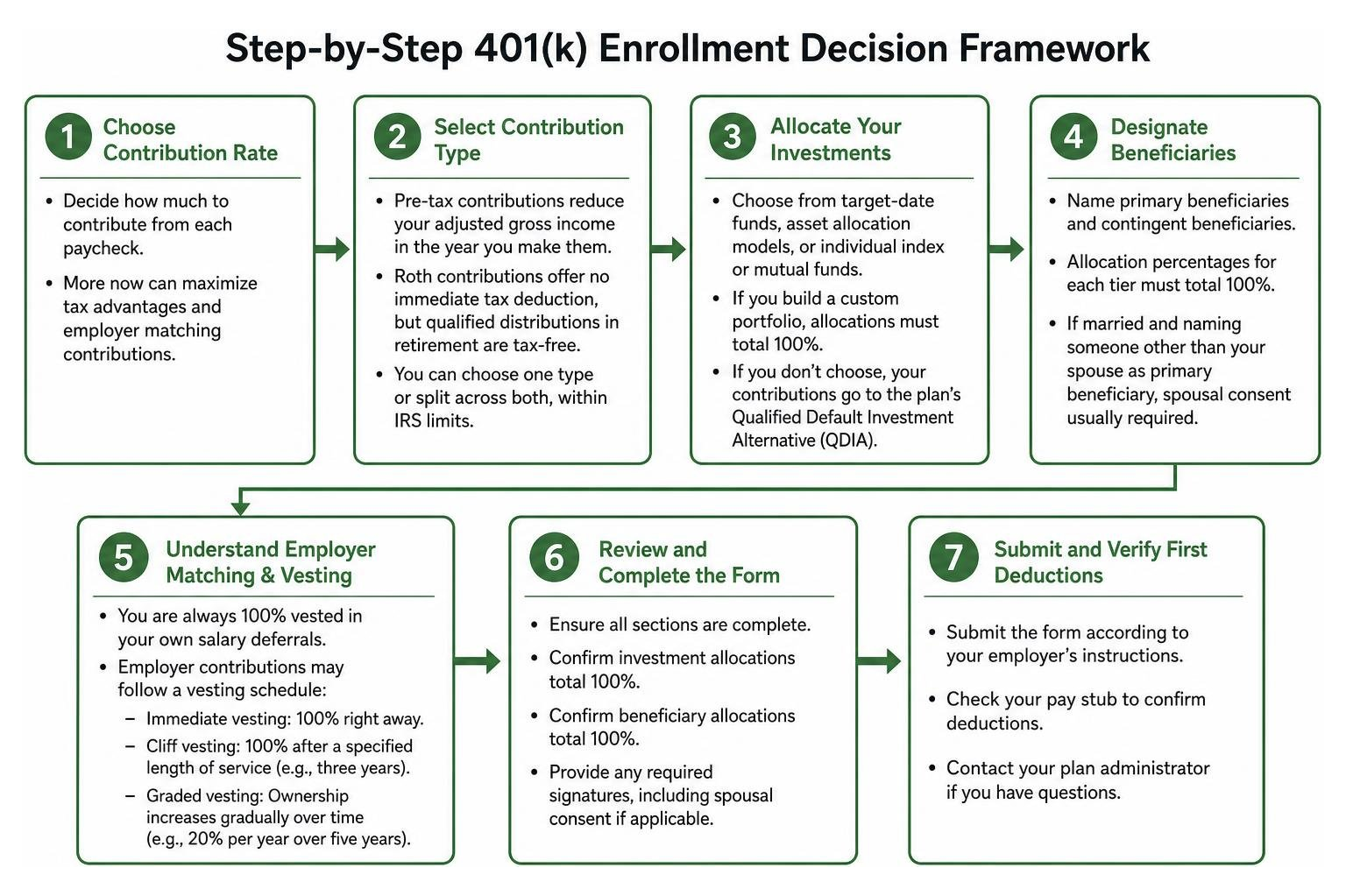
Completing your form involves choosing how much to save, deciding between pre-tax and after-tax tax treatments, selecting your investments, and designating beneficiaries. Each choice affects your paycheck and your long-term savings, so it helps to take them one at a time.
First, determine your contribution rate. Most enrollment forms let you choose either a percentage of your salary (such as 1% to 80%) or a fixed dollar amount per pay period. Selecting a percentage allows your contributions to adjust automatically alongside any future pay raises.
When deciding how much to contribute to your 401(k), review that your total annual elective deferrals stay within federal limits. For reference, according to the IRS contribution limits guidance, the standard elective deferral limit under IRC Section 402(g) was $23,000 for tax year 2024 and $23,500 for tax year 2025. Employees age 50 or older by the end of the calendar year may also make additional catch-up contributions beyond standard thresholds.
Choosing pre-tax deferrals vs. Roth 401(k) contributions
If your plan document allows Roth contributions, your enrollment form will ask you to designate how your savings are split between traditional pre-tax and Roth after-tax dollars.
| Feature | Traditional Pre-Tax 401(k) | Roth 401(k) (If Plan Allows) |
|---|---|---|
| Upfront Tax Impact | Lowers current-year taxable income | Contributions made with after-tax dollars |
| Investment Growth | Tax-deferred until withdrawal | Tax-free potential over time |
| Withdrawals in Retirement | Taxed as ordinary income | Qualified distributions are 100% tax-free |
| Employer Matching Funds | Taxed upon distribution | Taxed upon distribution (unless designated Roth match) |
Pre-tax contributions reduce your adjusted gross income in the year you make them, which may benefit individuals in higher current tax brackets. Roth contributions offer no immediate tax deduction, but qualified distributions in retirement are completely tax-free. You can choose one type or split your total contribution across both, provided the combined sum does not exceed annual IRS limits. Roth contributions are available only if your plan allows them, so check your Summary Plan Description (SPD) to confirm.
Allocating investments on your 401(k) enrollment form
After choosing your contribution rate, you must allocate your money across the plan’s available investment lineup.
Workplace plans typically offer:
- Target-Date Funds: Portfolios designed around an anticipated retirement year that aim to shift toward more conservative holdings as that date approaches.
- Asset Allocation Models: Pre-built portfolios categorized by risk tolerance, such as conservative, moderate, or aggressive.
- Individual Index or Mutual Funds: A menu of standalone stock, bond, and money market funds that let you build a custom portfolio.
When designing a custom portfolio on your form, your allocations across individual funds must equal exactly 100%. If you submit a form without selecting investment options, the plan will place your contributions into its Qualified Default Investment Alternative (QDIA), which is often a target-date fund or balanced fund.
Investing involves risk of loss, including the possible loss of principal. Diversification and asset allocation strategies do not guarantee a profit or protect against market declines.
Designating beneficiaries and understanding vesting
The beneficiary section identifies who receives your account balance in the event of your death. You will name primary beneficiaries (first in line) and contingent beneficiaries (who receive assets if no primary beneficiary survives). The allocation percentages for each tier must total 100%. If you are married and wish to name someone other than your spouse as primary beneficiary, federal law and plan rules generally require signed, notarized spousal consent.
Your form may also reference employer matching contributions and vesting schedules. While you are always 100% vested in your own salary deferrals, employer contributions may follow a vesting schedule:
- Immediate Vesting: You own 100% of employer matching funds right away.
- Cliff Vesting: You gain 100% ownership after completing a specified length of service (e.g., three years).
- Graded Vesting: Your ownership percentage increases gradually over time (e.g., 20% per year over five years).
For full details on vesting standards, review the Department of Labor’s retirement plan guidance or your plan’s SPD.
Submitting your form and verifying first deductions
Once you have completed all sections, submit the document according to your employer’s instructions:
- Check for Completeness: Confirm all numbers add up to 100% and that every required field is completed.
- Sign and Date: Ensure physical forms have a clear handwritten signature and electronic forms have verified digital authorization.
- Submit to HR: Deliver the form to your Human Resources or payroll department, or submit it through your company’s online benefits portal.
- Keep Personal Records: Retain a completed physical or digital copy for your files.
- Inspect Your Pay Stub: Review your next one to two pay stubs to verify that payroll deductions match your chosen percentage and contribution type.
If the deduction amount or tax treatment does not match your election, notify your payroll department promptly so the record can be corrected.
Key takeaways for completing your 401(k) enrollment
- Capture Employer Matching Funds: If your employer offers a matching contribution, consider contributing enough to receive the full match allowed under the plan rules.
- Choose the Right Tax Structure: Evaluate whether traditional pre-tax, Roth after-tax, or a combination fits your current tax bracket and future goals.
- Verify Investment Percentages: Confirm that all fund allocations add up to exactly 100% to avoid administrative processing delays.
- Complete Beneficiary Information: Name primary and contingent beneficiaries, obtaining notarized spousal consent if naming a non-spouse.
- Confirm Payroll Deductions: Inspect your pay stub after enrollment to verify that deductions have started accurately.
Frequently asked questions about 401(k) enrollment
What happens if I don’t turn in my 401(k) enrollment form?
If your employer uses automatic enrollment, you may be enrolled automatically at a default contribution rate, and your money will be placed into the plan’s default investment option. If your plan does not offer auto-enrollment, no salary deferrals will occur, and you will not receive any available employer matching contributions until you submit an active election.
How do I decide how much to contribute when I enroll in a 401(k)?
Start by checking your company’s matching formula so you can capture available employer funds. Next, review your monthly budget and balance your contribution against annual IRS elective deferral limits. Reviewing important questions to consider before enrolling can help you select a sustainable savings rate.
Can I change my contribution rate and investments after submitting the form?
Yes. Most workplace plans allow participants to adjust contribution percentages, change tax elections, or rebalance investment choices throughout the year via an online benefits portal or by submitting an updated change form. Consult your plan administrator or SPD for any timing restrictions.
Managing workplace retirement accounts involves ongoing decisions long after the initial paperwork is submitted. The 401(k) Maneuver team provides independent fiduciary account management to help participants navigate investment options and risk over time. To learn more about our account management approach, explore how our account management works or speak directly with an adviser at 1-877-218-5060.
Disclosures: 401(k) Maneuver is a business name of Royal Fund Management, LLC, an SEC-registered investment adviser. Information presented is for educational purposes only and does not intend to make an offer or solicitation for the sale or purchase of any specific securities, investments, or investment strategies. Investments involve risk and are not guaranteed. Past performance is no guarantee of future results. Consult with a qualified financial adviser or tax professional before implementing any financial strategy.